
For studios · Schedule & Bookings
Bookings and check-in
See who's booked, check people in, add someone at the door, and edit or cancel a class.
Open any class from your schedule to see everyone who’s booked and run it on the day.
At a glance
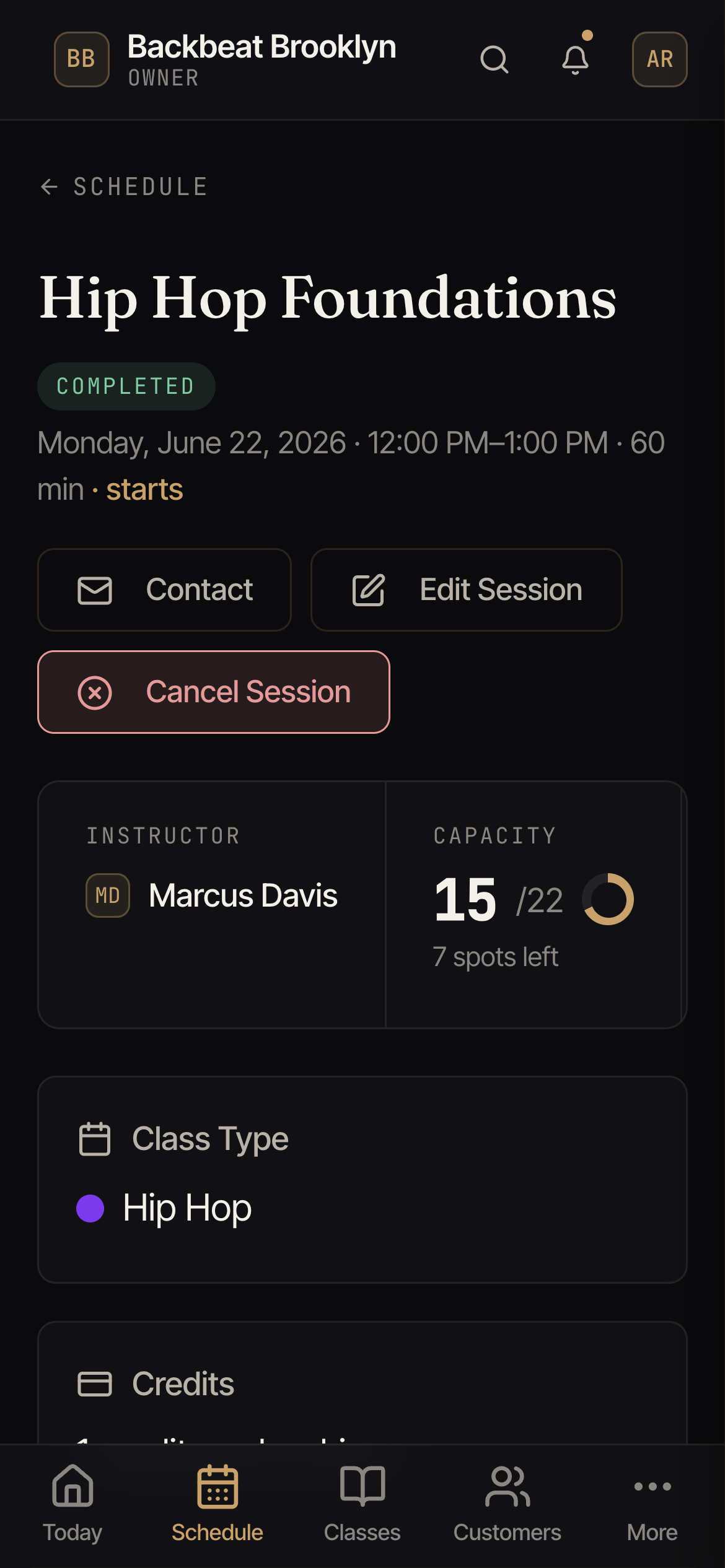
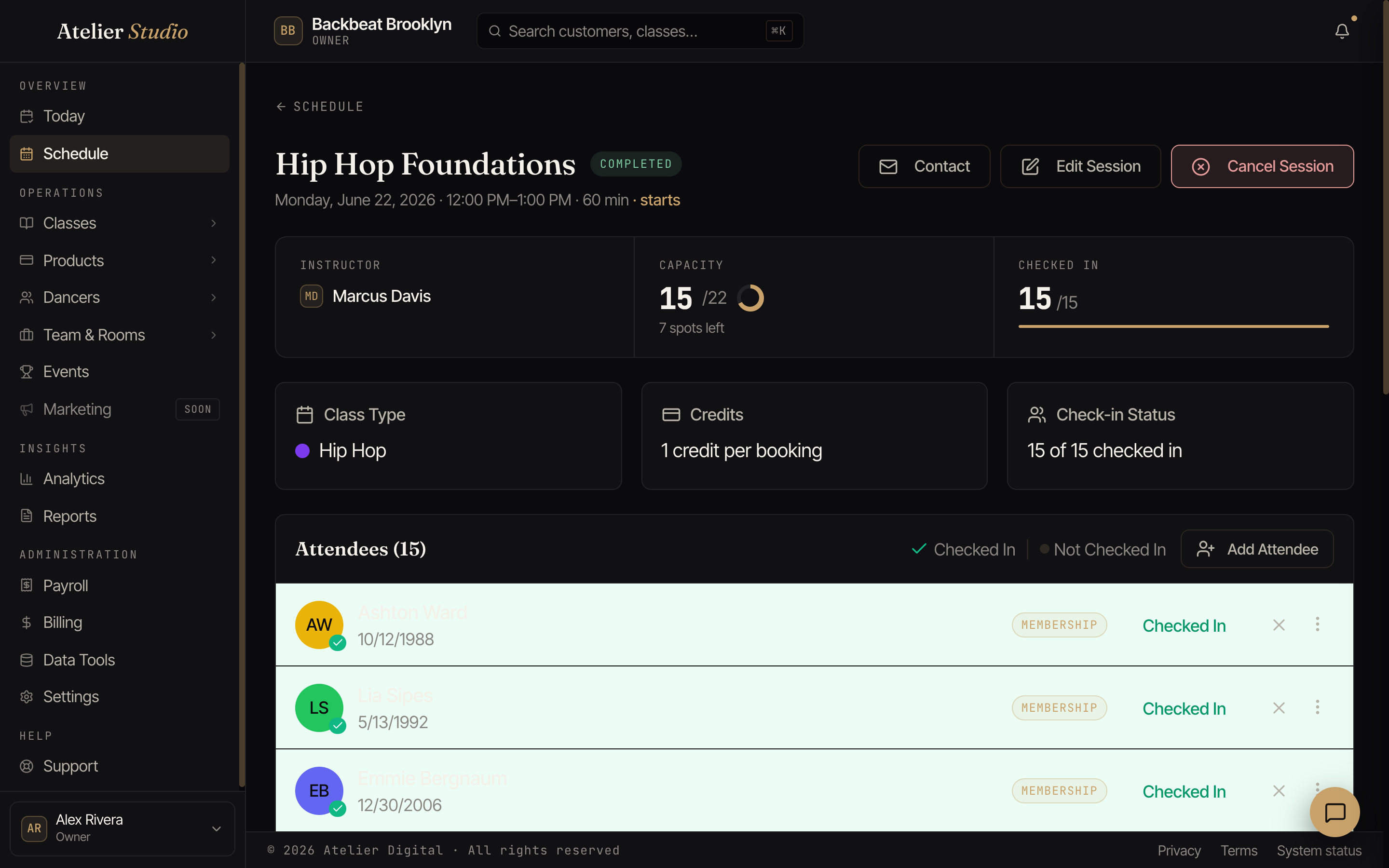
The cards across the top tell you the essentials: the instructor, the capacity (and how many spots are left), and how many people are checked in so far.
What the status labels mean
Each person on the list has small labels next to their name. One label tells you where they are in the class. Another tells you how the class is paid for. The color tells you how much attention it needs.
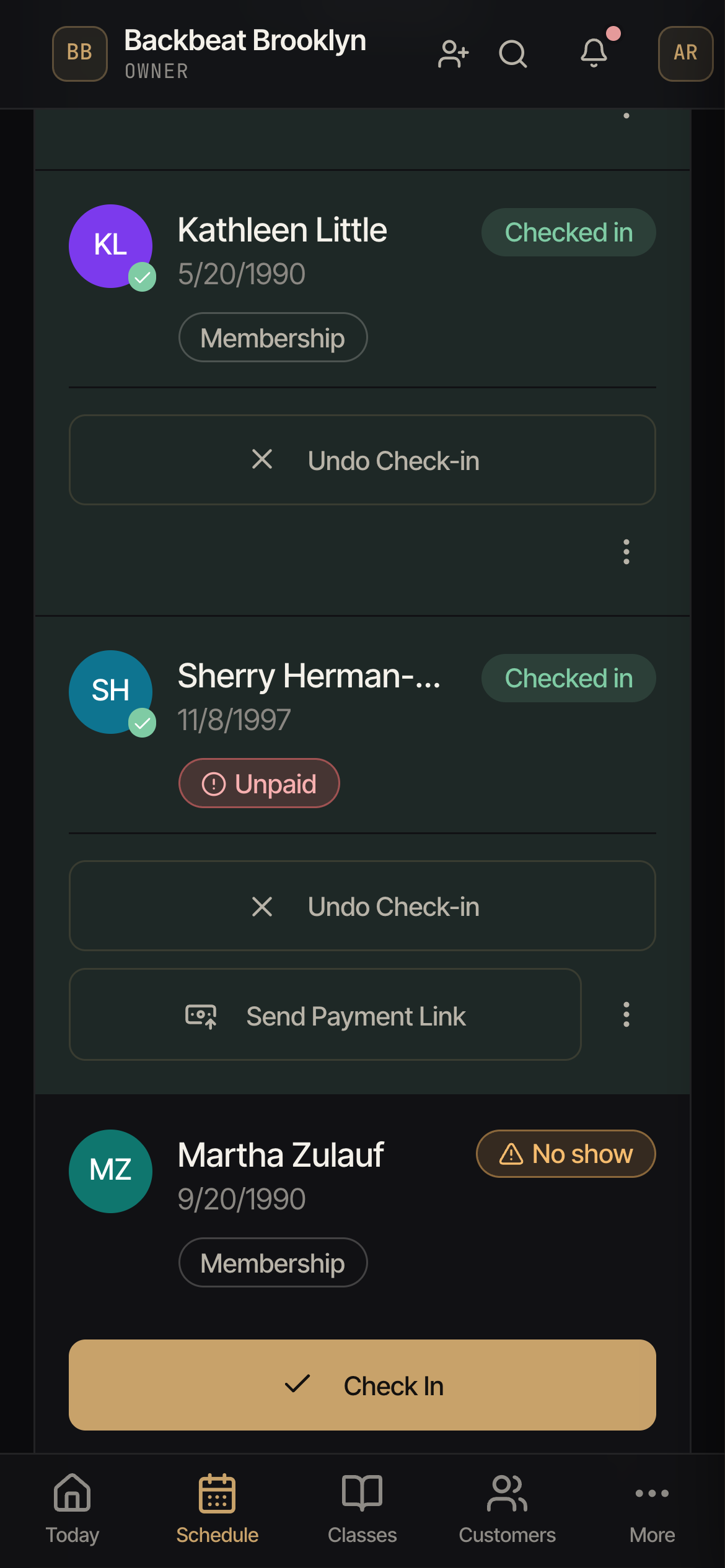
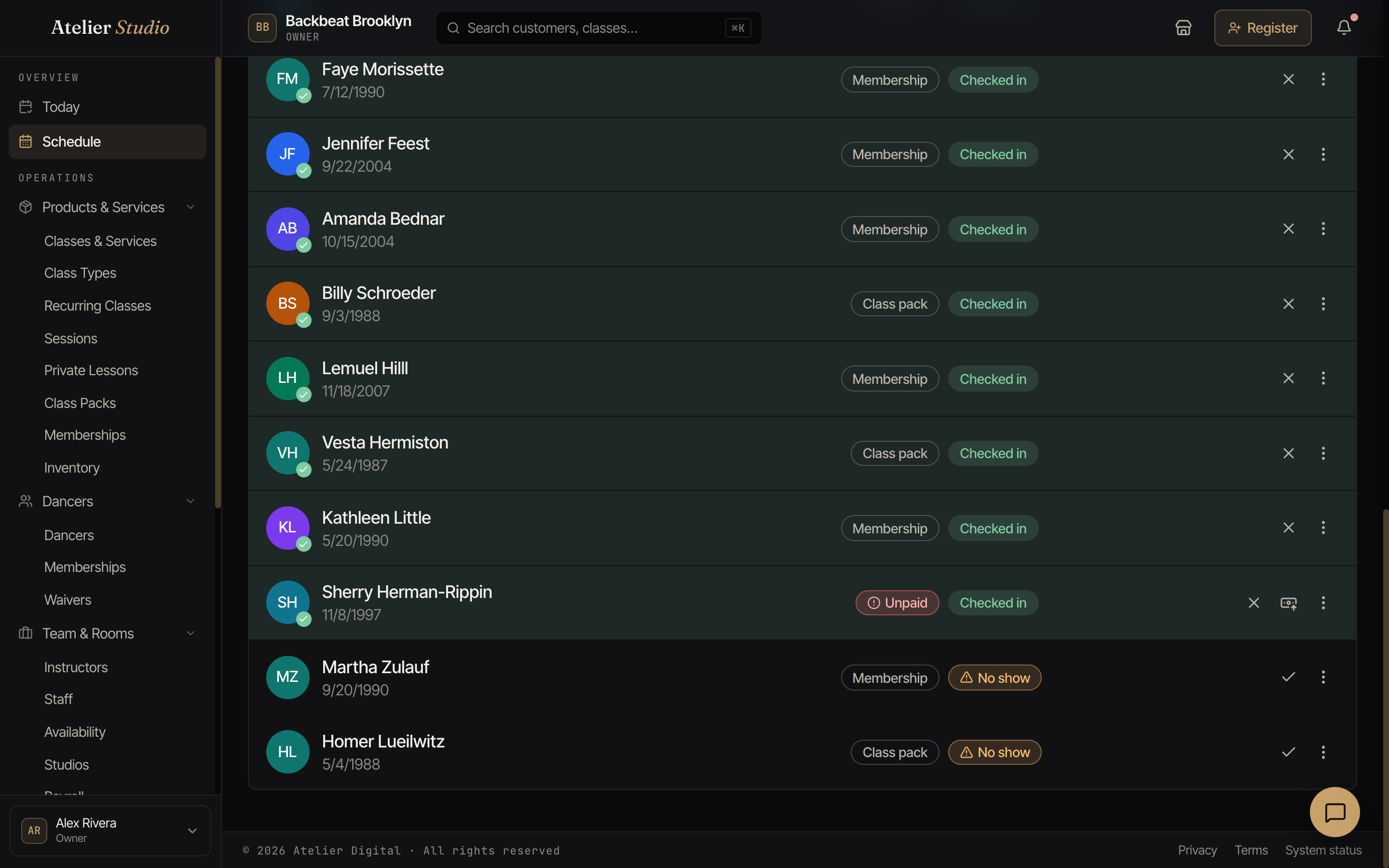
Red means money is owed. Nothing else is ever red. If you see red, someone has not paid, or a payment did not work.
| Color | What it means |
|---|---|
| Red | Money is owed or a payment failed. Act on it. |
| Orange | Something needs your attention, but no money is owed. |
| Teal | Waiting. Nothing is wrong. It will change on its own or after a step. |
| Green | Done. Checked in, attended, or paid. |
| Gray | Nothing to do. For example, a booking that is simply booked, or a cancelled one. |
| Gray outline | How the class is paid for, such as Membership or Class pack. |
| Label | Color | What it means |
|---|---|---|
| Unpaid | Red | No payment is recorded for this class. |
| Payment failed | Red | The card was declined. Ask for another way to pay. |
| Awaiting payment | Orange | You sent a payment link and it is not paid yet. |
| Paid, not confirmed | Orange | The person paid, but the spot is not confirmed yet. |
| No show | Orange | They did not come. |
| Late cancel | Orange | They cancelled too close to the class start. See your policies. |
| Not checked in | Orange | The class is finished and they were never checked in. |
| Bills today | Teal | A private lesson that is billed today. It turns into Unpaid (red) from the next day if it is still not billed. |
| Pay at check-in | Teal | A weekly spot that is paid by card when they arrive. It turns into Unpaid (red) if the class ends and nobody has paid. |
| Waitlisted | Teal | They are waiting for a spot to open. |
| Awaiting start | Teal | The membership starts later. The seat is held until then. |
| Awaiting renewal | Teal | The seat is held until the membership renewal goes through. |
| Pending | Teal | Not confirmed yet. |
| Checked in, Attended | Green | They came. It says Checked in while the class is running and Attended after the class ends. |
| Paid online, Paid: Cash and similar | Green | The class is paid, and the label says how. |
| Booked | Gray | They have a spot and the class has not started. |
| Cancelled, Refunded | Gray | Nothing more to do. |
| Membership, Class pack, Class credit, Complimentary | Gray outline | What paid for the spot. |
The class itself: Ended
At the top of the class page, a label shows the state of the class, such as Scheduled or Completed. When a class is over but your studio is still inside its no-show waiting time (for example 48 hours), the label says Ended in gray. Nothing about the class changes. Ended is only a clearer word than Scheduled for a class that already happened. Atelier Studio marks it Completed after the waiting time, so you still have time to fix attendance.
You see the same labels and colors on the class list, the check-in screen, a customer’s profile, terms, and events. Light and dark mode use the same meaning. The labels also have small icons (a circle with an exclamation mark for red, a triangle for orange), so you can tell them apart even if you have trouble seeing colors.
Checking people in
Below that is the list of everyone booked. As each person arrives, mark them checked in. It’s handy for knowing who actually came, and it feeds your attendance numbers.
Use the Checked In / Not Checked In filter to quickly see who’s still to arrive.
Collecting payment as you check in
If someone still owes for the class (a drop-in who hasn’t paid, or a weekly pay-at-check-in spot), you can settle it right from the check-in screen instead of chasing it later. Open their check-in and, when it applies, you’ll see:
- Charge card on file: charge the customer’s saved card for the class on the spot. You’ll see a full breakdown of the class price, any registration fee, and the total before you confirm.
- Record Payment: note a cash or in-person payment instead (see Taking payment in person).
If there’s nothing to collect (they’re on a membership or a pass, or they’ve already paid), you simply check them in. For a private lesson, the check-in screen says No payment is needed for this booking. The lesson is billed on its own schedule.
If a student’s only open spot is one that is paid at the front desk, their registration fee is collected here. The Registration fees report lists them as Collected at check-in, not as needing attention.
If a registration fee is part of that total, there’s a Don’t charge link right next to it, with the same Just this time / Charge it next season / Never choices as signing someone up. See Not charging the registration fee for what each one does.
No-shows
Once a class has ended, anyone who was booked but never checked in shows as Not checked in. After your no-show grace period passes, they’re finalized as a No Show. You’ll see that label on their row, and they still count toward the class’s booked total, the same number you see on the schedule.
The list shows everyone booked except people on the waitlist, each with a status badge: Not checked in, Checked In, No Show, Cancelled, Late Cancel, Pending or Payment Pending. Cancelled and late-cancelled bookings now appear too, so you can see who dropped out. Cancelled and Pending rows are muted and read-only, and they don’t change your counts or capacity.
You can also step in yourself. Open the ⋯ menu on a person’s row:
- Mark as No Show: finalize it now instead of waiting. You’ll see a short summary first of what it will do: whether they get a make-up class credit (or the class goes back on their class pack), and whether it’s their Nth no-show in a row on a weekly spot, which pauses that spot at your limit. It’s the same result you’d get if Atelier Studio finalized it automatically.
- Undo No Show: for a mistake or a dispute. If the make-up credit hasn’t been used, it’s taken back; if they’ve already spent it, they keep it. Their no-show streak goes down by one, and a paused weekly spot starts again.
- Check in a No Show late: if they turn up after all, check them in as usual. The no-show is reversed the same way as Undo, and the confirmation tells you what will change.
Prefer to take attendance later and mark no-shows yourself? Turn off Automatically finalize no-shows in Booking policies.
Late cancels and Give class back
When a member cancels too close to the start of the class, the row shows Late cancel. A late cancel keeps the class: it still counts as used on their membership or class pack, in line with your policies.
If you decide the member should not lose the class, you can give it back.
- Open the ⋯ menu on the Late cancel row. You can also do this on the Bookings tab of the student’s profile.
- Choose Give class back.
- Read the message and select Give class back to confirm. The member gets 1 class back on their membership or class pack.
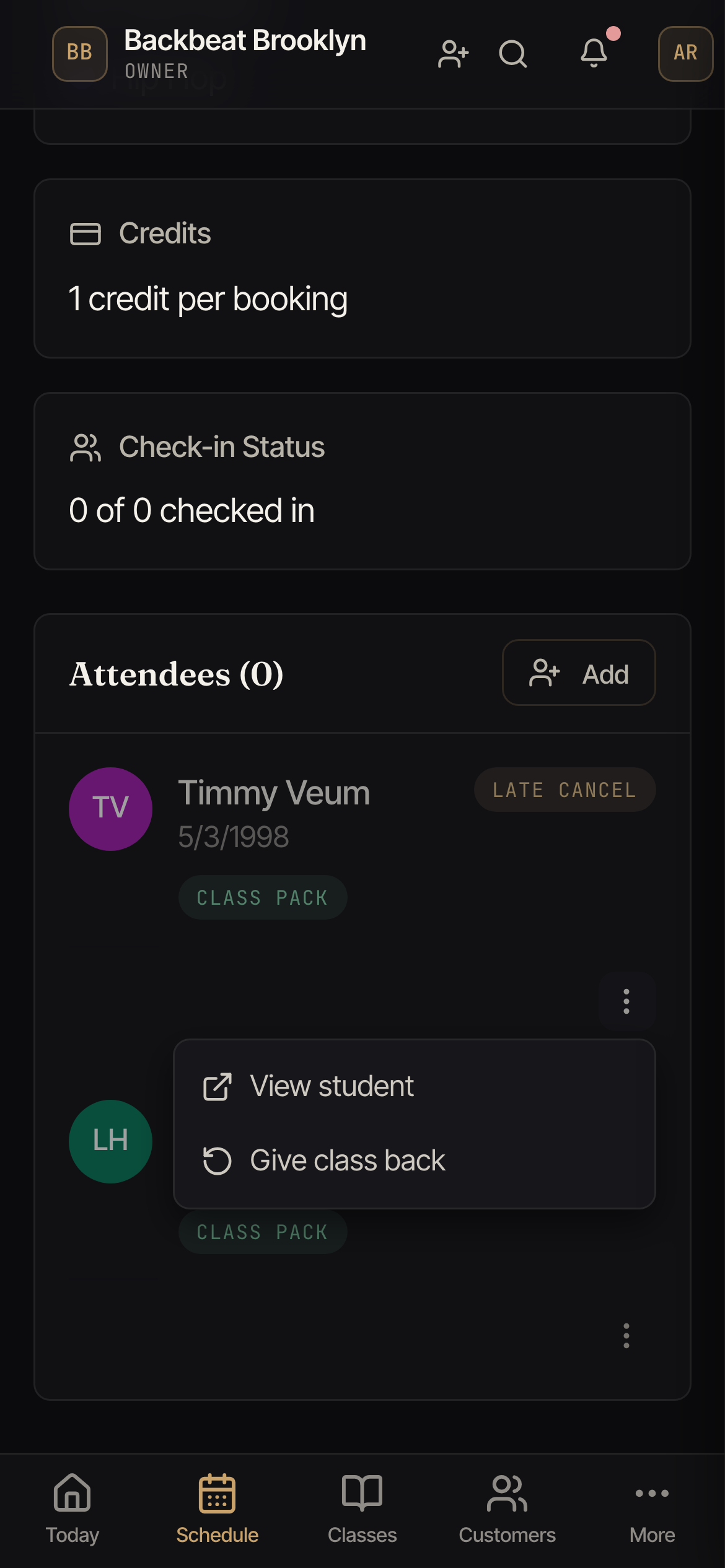
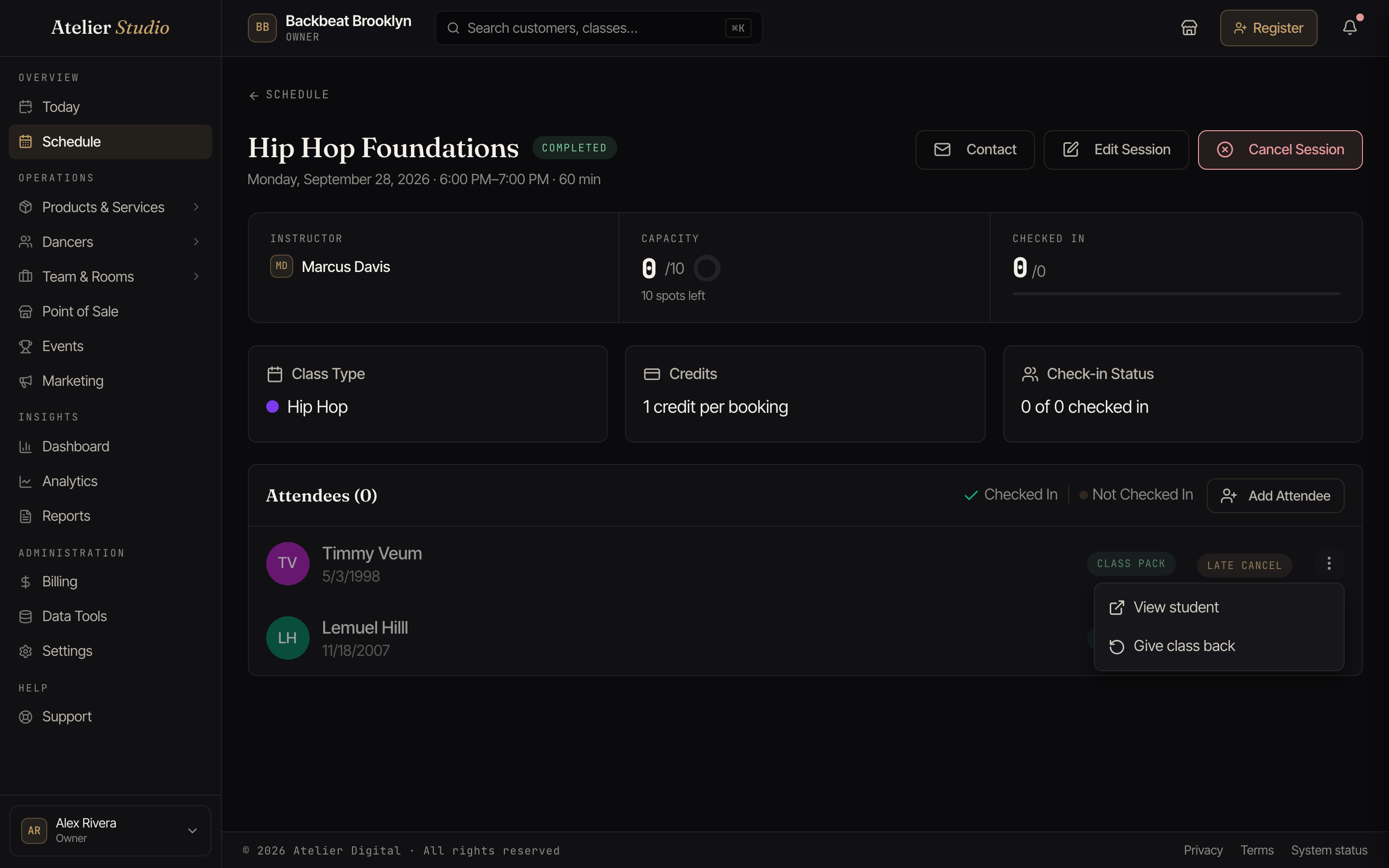
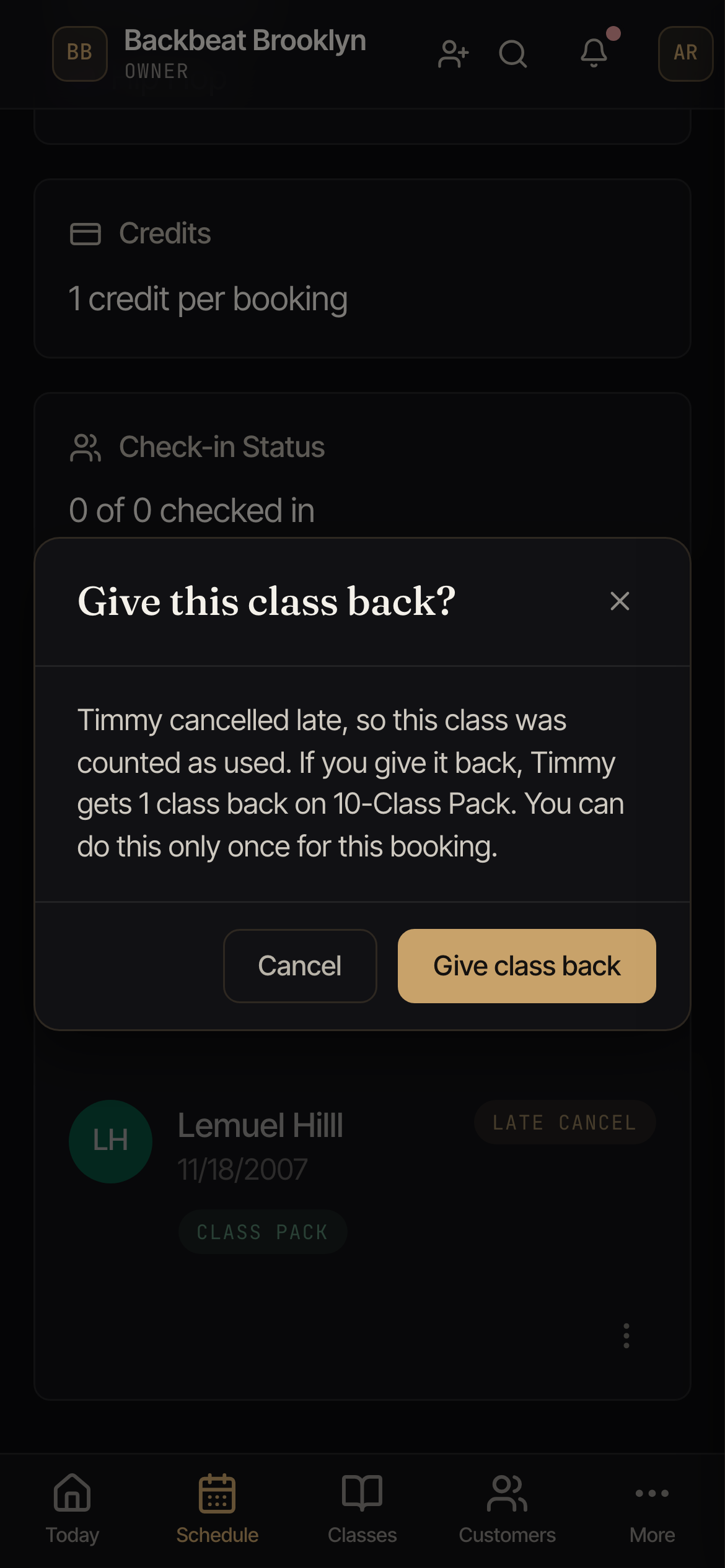
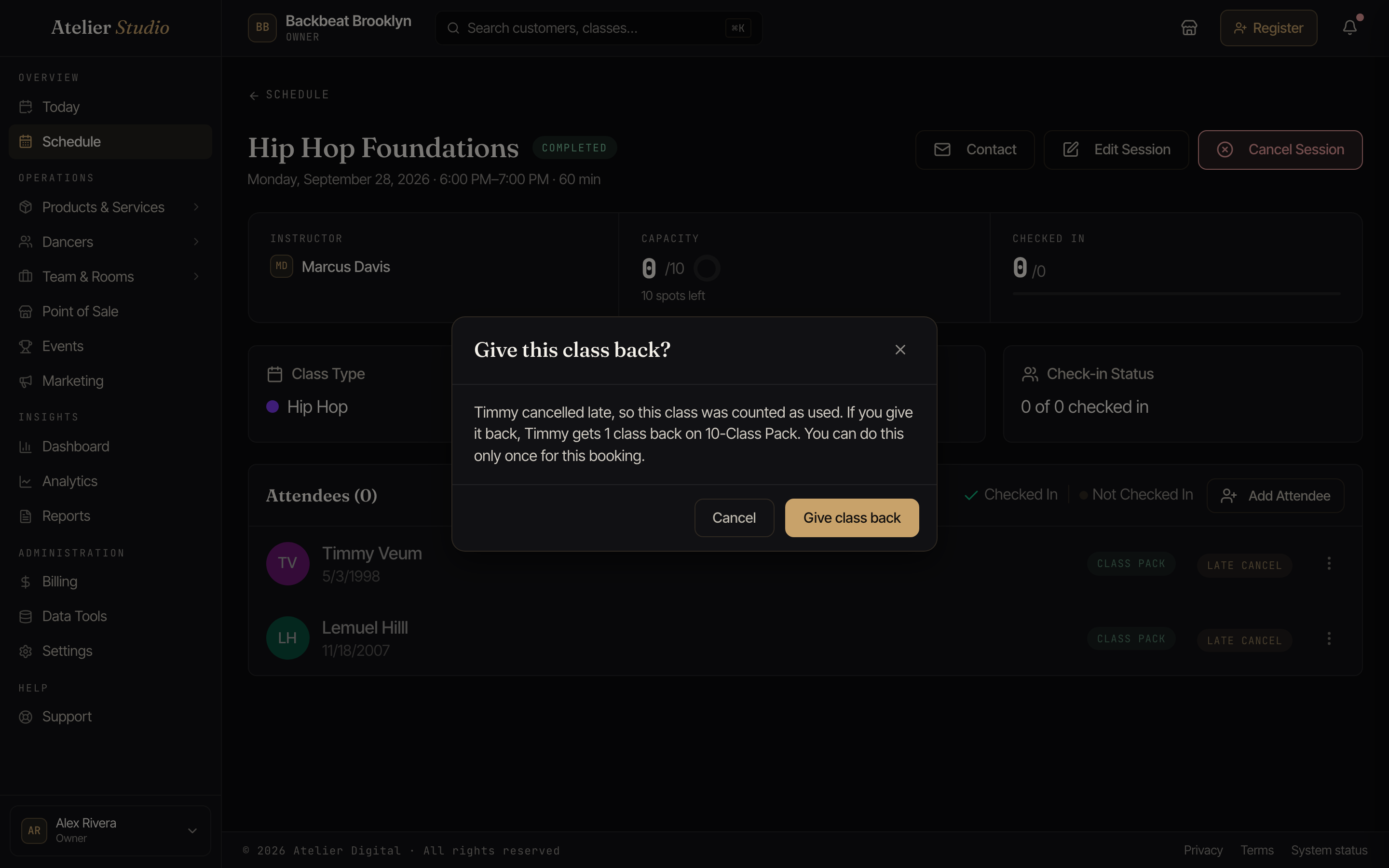
You can give a class back only once for each booking. The booking stays cancelled and still shows as a late cancel in your history, and the row now reads Cancelled · class given back. No money moves, and the member does not get an email or text. They see Cancelled (class returned) in their account.
The menu item is gray, with the reason next to it, when the class cannot go back:
- The member booked the same class again, so the new booking is using this class.
- The class pack has expired.
- The class was in a period that has already ended on their membership.
- The membership has ended.
You do not see Give class back for people on an unlimited membership (a late cancel costs them nothing), for a class paid by card or in cash, or if you do not have permission to manage bookings.
Adding someone at the door
Got a walk-in? Select Add Attendee and pick the person (or add a new one) to book them straight into the class, as long as there’s room.
Booking a party of more than one
Booking for a group under one person, like a birthday party, a family dropping in together? Set Spots to however many are coming (up to 20). It’s one booking that holds that many places, with a single registration fee for the whole booking (not one per spot).
Once you pick more than one spot for a paid booking, how it’s priced depends on the class:
- A class with party pricing set up prices itself: the drop-in price covers the class’s included spots, and each spot beyond that is charged at the class’s extra-spot price. You’ll see the breakdown on the confirm step, for example “$150.00 (includes 3 spots) + 1 extra spot × $35.00” for a party of 4. There’s no per-spot/group choice to make; the class’s rule is the price.
- A class without party pricing shows the older Pricing choice
instead:
- Charge per spot (the default): the drop-in price times the number of spots. Five spots at $75 is $375.
- One price for the group: a single drop-in covers everyone. Five spots at $75 is $75. Use this when a class sells a slot that fits several people for one price, and you haven’t set up party pricing on it.
Either way the booking takes up every spot in the class.
If the class doesn’t have that many spots open, you’ll see a warning with how many are available. Confirm to book everyone in anyway (overbooking the class) rather than being sent to the waitlist. That applies even when you’re just booking one person into a full class: booking always confirms or asks you to confirm an overbook, it no longer waitlists automatically.
The attendee list shows a spots badge (e.g. “4 spots”) on any booking that covers more than one place, so it’s clear at a glance who’s bringing a group.
Reducing a party’s spots
If part of a group cancels, open the booking and choose Reduce Spots to lower the count. The freed places go back to the class (and to anyone on the waitlist).
What refunds depends on how the class was priced:
- Charge per spot: a card-paid booking gets a proportional partial refund for the spots you release.
- One price for the group, or a party-pricing booking where the freed spots were within the included count: no money moves, since the price didn’t depend on those spots.
- A party-pricing booking reduced below its included spots: you get back the extra-spot price for each freed spot that was being charged as “extra”. Using the flying-trapeze example above, dropping a party of 5 ($220) to 4 ($185) refunds $35, and dropping from 4 to 3 ($150) refunds another $35. Dropping from 3 to 2 refunds nothing, since those spots were already included in the $150.
An offline or comped booking never moves money on a reduction, whatever the pricing. The registration fee is never refunded, since it was only charged once for the whole booking. You can only reduce a party’s spots, not add more to an existing booking. To add people, book them as a new booking instead.
Messaging the class
Select Contact to email everyone booked into this class at once. It’s perfect for a last-minute “we’ve moved to the other studio” note.
Rescheduling a student to a make-up class before class starts
Sometimes a student calls in sick before the class. You do not have to wait for the class to end. Open the class, find the student’s row, open the menu, and choose Reschedule to a make-up class. You can also do this from the Bookings tab on the student’s profile. You see it only if you have permission to manage bookings, and only on a booked student in a group or series class that has not started yet. For private lessons, see Scheduling a make-up lesson.
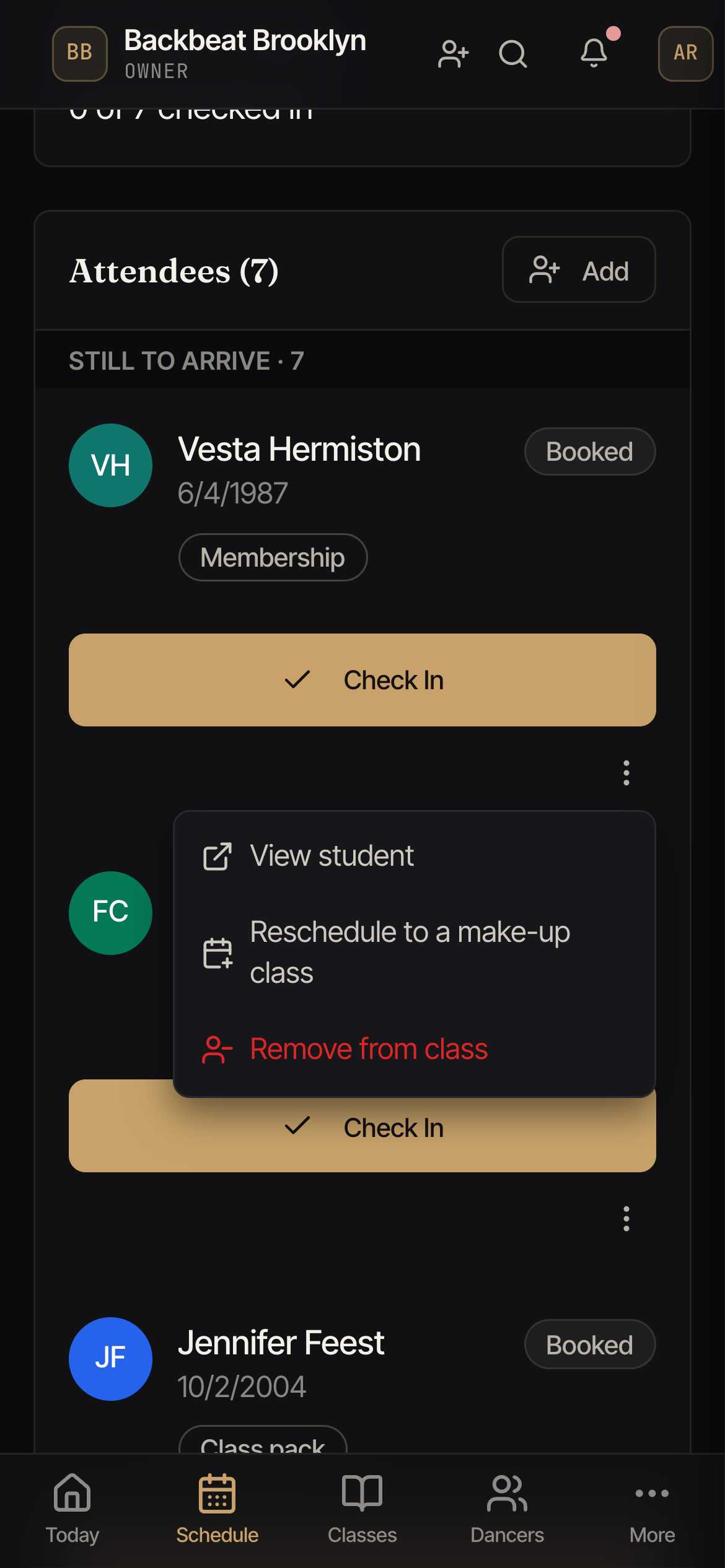
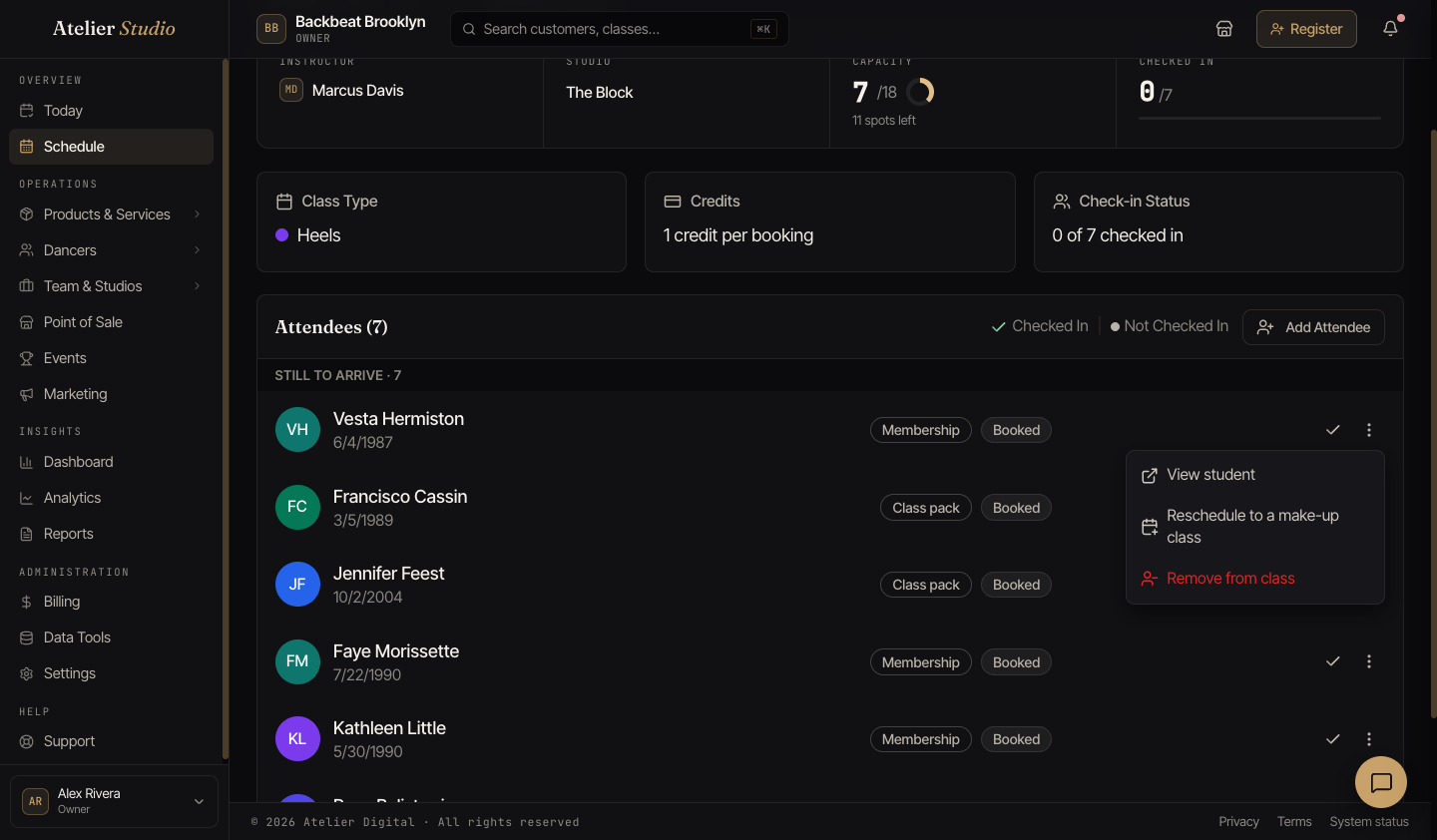
- Pick a class for the make-up. Turn on Show all classes to see every class at your studio, and select Continue.
- Read the note: Their spot in this class will open up for someone else. The make-up class is free: nothing is charged or refunded.
- Leave Send the student a booking confirmation on if you want them to get an email, or turn it off. Then select Reschedule. You see a message such as Rescheduled to a make-up class on followed by the date and time.
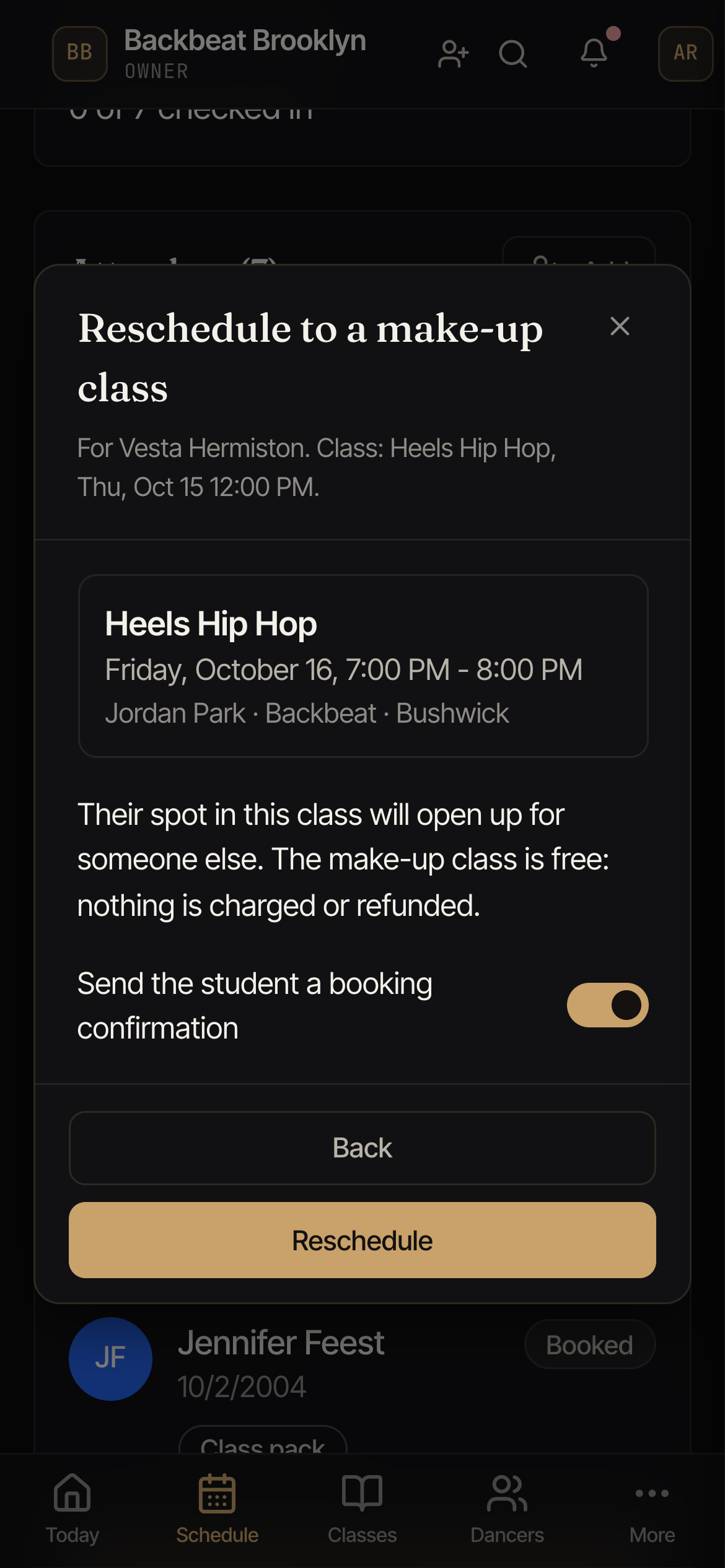
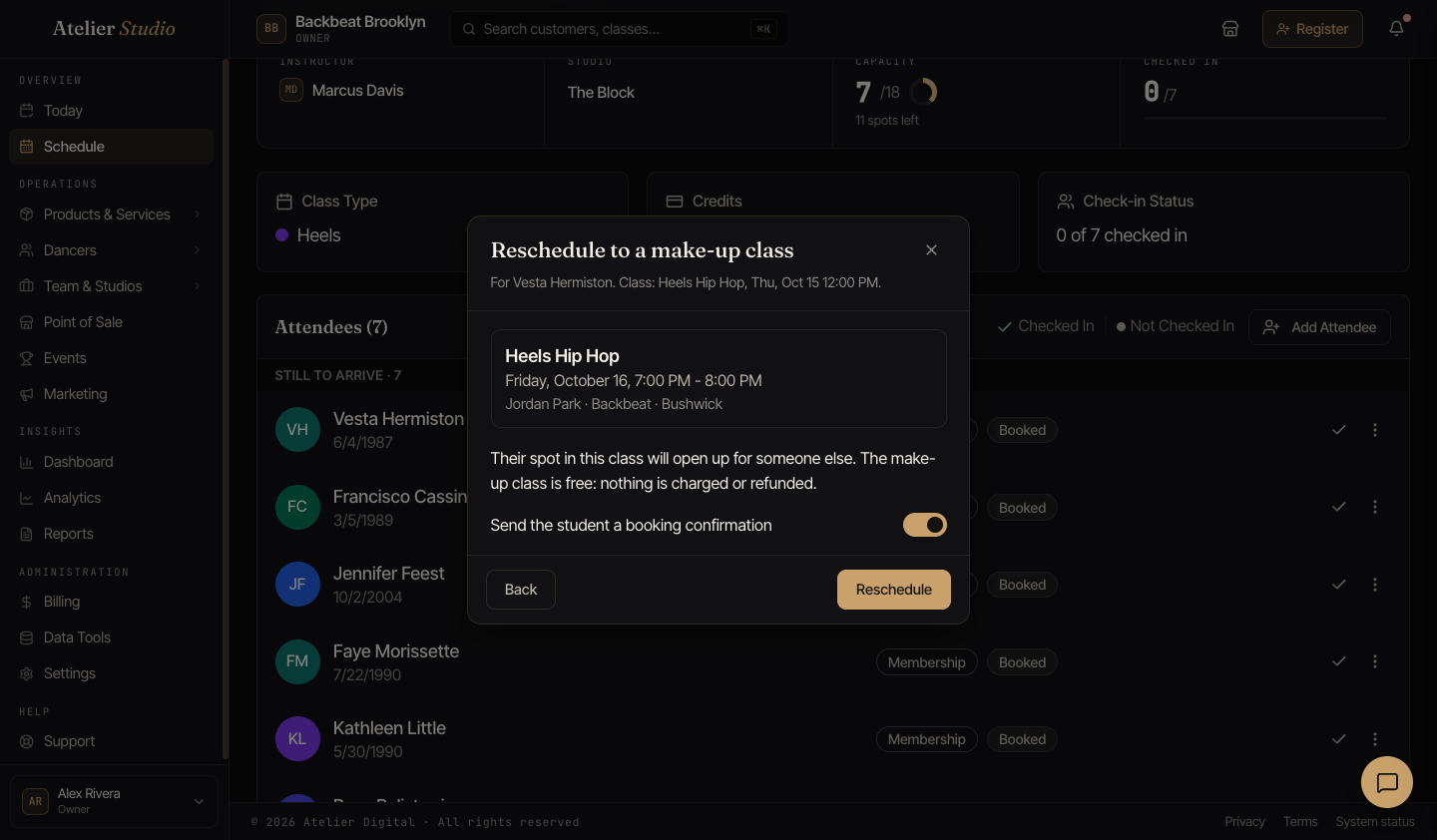
What happens:
- The student’s booking in the first class is marked Excused. It still counts toward the allowance of a membership that has a limit on classes.
- Their spot goes back to the class. Anyone on the waitlist can be offered it.
- The student is booked into the make-up class for free. Nothing is charged, and nothing is refunded.
If you change your mind, you can choose Undo excused on the first booking before that class starts. If the class has filled up again in the meantime, you see This class is full now, so they can’t be put back in. In that case the student stays excused.
Scheduling a make-up class
When someone is marked as a no-show, you can book them into another class as a make-up class. Open the menu on their row and choose Schedule make-up. You see this only if you have permission to manage bookings, and only on a no-show row.
- Pick a class. At first you see upcoming classes of the same class. Turn on Show all classes to see every class at your studio. Use Show more to look further ahead.
- Read the line that says how the make-up is paid for. Atelier Studio picks this for
you, and you cannot change it:
- This uses their make-up credit. Used when the no-show gave them a credit that is still good.
- This uses 1 class from their pack. Used when the no-show put a class back on their pack.
- This make-up class is free. It does not use a class from their pack or membership. Used when nothing was given back, or when the credit ran out of time before they used it.
- Leave Send the student a booking confirmation on if you want them to get an email, or turn it off. Then select Schedule make-up.
A make-up class never costs the student anything. There is no charge, no registration fee, and no tax. In the roster and on the student’s bookings, it shows the word Make-up where the payment type goes.
Term and series classes. This also works when the missed class was part of a term or series. Pick another class in the same way. The make-up is a single class. It does not change the student’s term, their payments, or their other classes.
Private lessons. If the missed class was a private lesson, you book another private lesson with the same teacher instead. See Scheduling a make-up lesson.
If the class is full, you are asked to confirm before you add one extra spot. Select Book anyway only if you have room.
The no-show stays on their record. The no-show row now shows a line such as Make-up: Ballet 2, Thu, 5:00 PM, and you can select it to open that class. While the make-up is booked, you cannot undo the no-show, check the student in late, or remove them from the class. Cancel the make-up class first.
If you cancel a make-up that is already free, nothing goes back to the student. If it used a make-up credit or a class from a pack, that credit comes back, but only when you cancel before the class starts.
If Schedule make-up is gray, the reason is shown next to it. For example, the student already used the class they got back, the booking was never paid for, the student is no longer in the term or the lessons were cancelled, it was a group booking (more than one spot), or it was already a make-up class. A make-up class that is missed does not earn another one.
Editing or canceling
Edit Session changes the time, instructor, or capacity. Cancel Session calls the whole class off.