
For studios · Payments & Payouts
Your payouts
See your Stripe balance, when your money will arrive in your bank, and what is inside each payout.
A payout is money that Stripe sends from your Stripe balance to your bank account. The Payouts tab shows you all of this in one place: how much money you have, when it will arrive in your bank, and what is inside each payout.
Atelier Digital never holds your money. Your customers pay into your own Stripe account, and Stripe sends the money to your bank. This tab only shows you what Stripe reports.
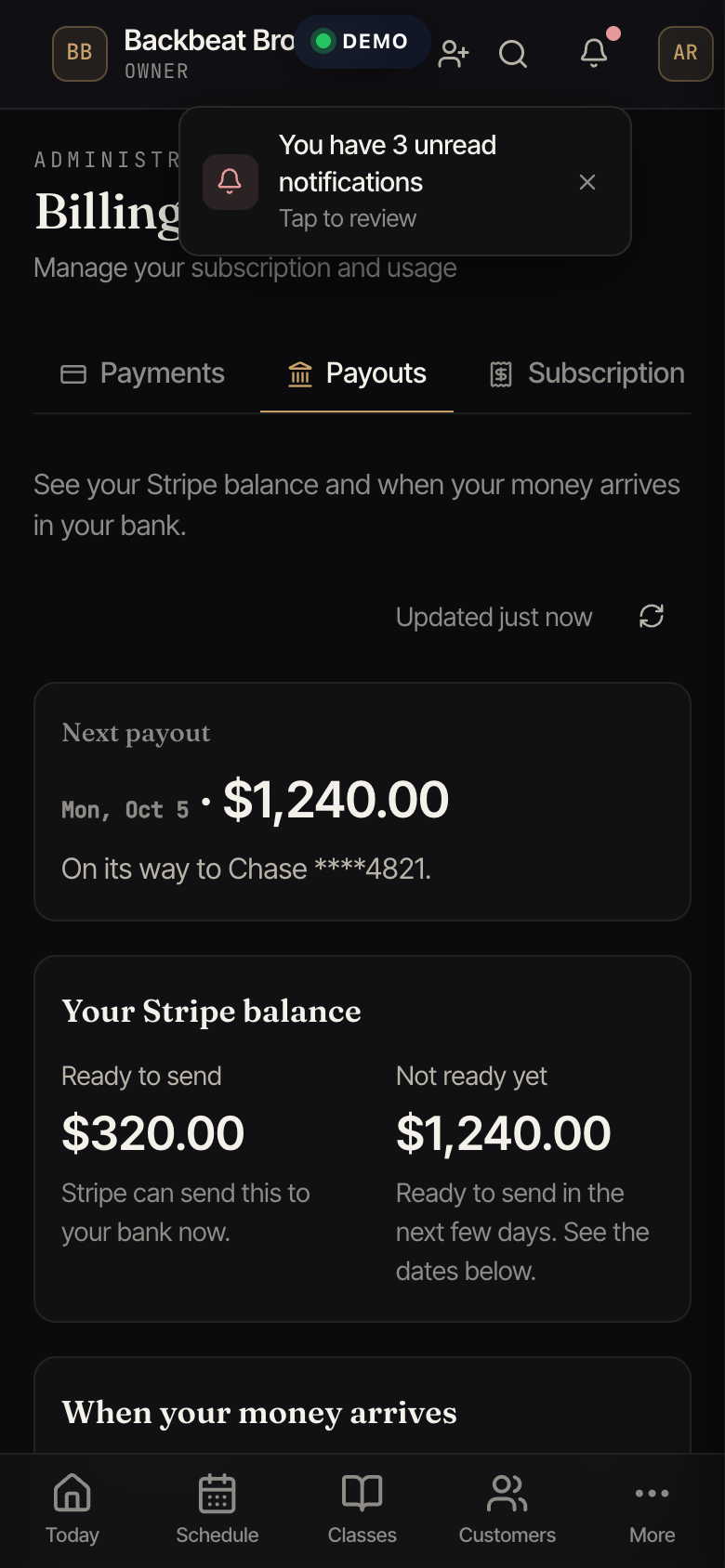
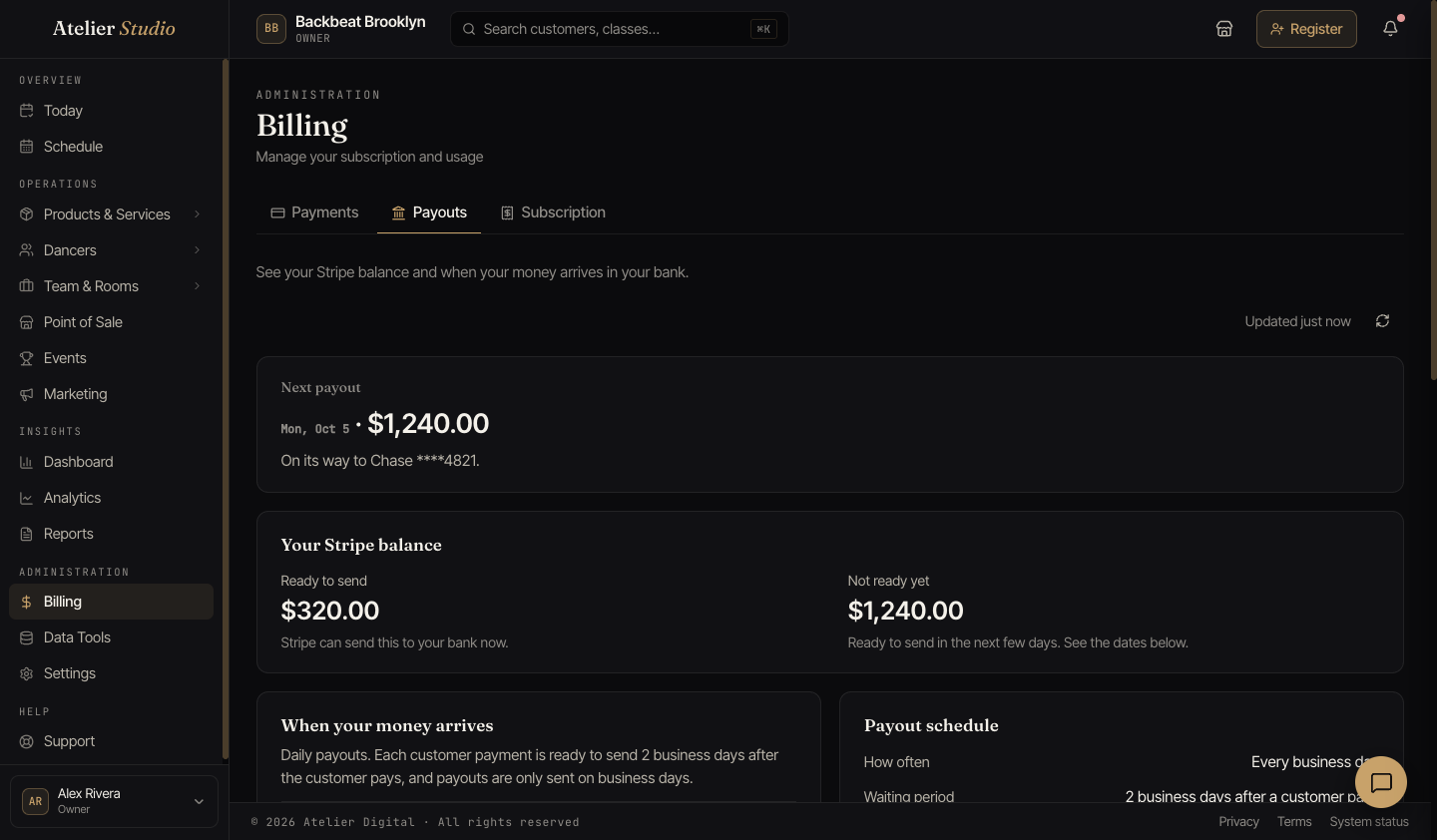
Where to find it
Open Billing and select the Payouts tab. You can see it if you are the studio owner, or if your role lets you see reports or manage studio billing. Staff who only see reports can read the tab but cannot open Stripe from it.
What you see
- Next payout. The amount and the date it should arrive in your bank. If the payout does not exist yet, the date is an estimate and it says so. The Payouts report also lists the payments in it.
- Your Stripe balance. Ready to send is money that Stripe can send to your bank now. Not ready yet is money from recent customer payments that will be ready in the next few days.
- When your money arrives. A list of dates. Each date shows how much money becomes ready to send on that day. If your payouts are automatic, it also shows when that money should reach your bank.
- Recent payouts. The latest payouts with the amount, the date, the status, and the bank account. Select See all payouts to see the full list. You can filter it by status.
- Payout schedule. One sentence about how often Stripe sends your money, and how long it waits after a customer pays.
- Instant payouts. Tells you if your account could use instant payouts. You cannot send an instant payout from Atelier Studio yet.
Select Refresh payouts to read the newest information from Stripe. The tab also shows when it was last updated.
Payout statuses
| Status | What it means |
|---|---|
| Scheduled | The payout is planned. It has not started yet. |
| On its way | Stripe has started the payout. It is moving to your bank. |
| Sent to your bank | Stripe sent the money. Your bank may take a day to show it. |
| Not sent | The payout did not work. The money is back in your Stripe balance. |
| Canceled | The payout was canceled. The money went back to your Stripe balance. |
Why is there a wait?
After a customer pays, your money does not reach your bank right away. Here is why:
- Your customers pay into your own Stripe account. Atelier Digital does not hold your money at any time.
- Card companies need a few days to send each payment to Stripe.
- Stripe sets the waiting period. If your studio already has the shortest wait Stripe allows in your country, the Payouts tab tells you.
- After the wait, Stripe sends the money to your bank on your payout schedule.
Business days are Monday to Friday. Weekends and bank holidays are not business days, and banks do not send payouts on those days. A payment made close to a weekend or a bank holiday takes longer to reach your bank.
You can read this answer on the Payouts tab and on the Payouts report, under Why is there a wait?
Why money from the weekend arrives on Monday
Stripe sends payouts only on business days (Monday to Friday, not bank holidays). Customer payments from Thursday to Sunday become ready to send on the next business days, so Stripe sends them together. The tab explains this under Why does money from weekend payments arrive on Monday?
See what is inside a payout
Select a payout to open it. You see the date, the bank account, and a reference number that you can copy. Below that is the list Included in this payout:
- Customer payment. What the customer paid, the Stripe fee, the Atelier fee, and the amount that went into your payout. Where possible, the row also shows the customer name and what they bought.
- Refund. Money you returned to a customer. It reduces the payout.
- Disputed payment. A customer asked their bank to take a payment back. See Disputed payments.
- Other changes. Money added or taken away for other reasons.
The Total at the bottom is the amount that was sent to your bank.
When something is wrong
Banners at the top of the tab tell you if a payout is not working:
- Payouts are paused or Stripe has restricted this account. Stripe needs more information, or it is reviewing your account. The banner says what to do.
- Stripe cannot send money to your bank. The bank account is missing, or the bank did not accept it.
- Your Stripe balance is below zero. This usually happens after refunds. New customer payments cover it first. If it stays below zero, Stripe may take the missing amount from your bank account.
When a payout is Not sent, open it. It tells you the reason in plain words, for example that the account number is not correct, and what to do next. You also get a notice in Atelier Studio when a payout is not sent or when your payouts are paused.
To fix a bank problem, select the button in the banner. It opens your Stripe dashboard. Only the studio owner, and staff who manage studio billing, can open Stripe from here. If you do not see the button, ask one of them to fix the problem.
If Atelier support is helping you
When Atelier Digital support views your studio to help you, they can look at your payouts. They cannot send money or change any payout settings.